Client ATextile mill
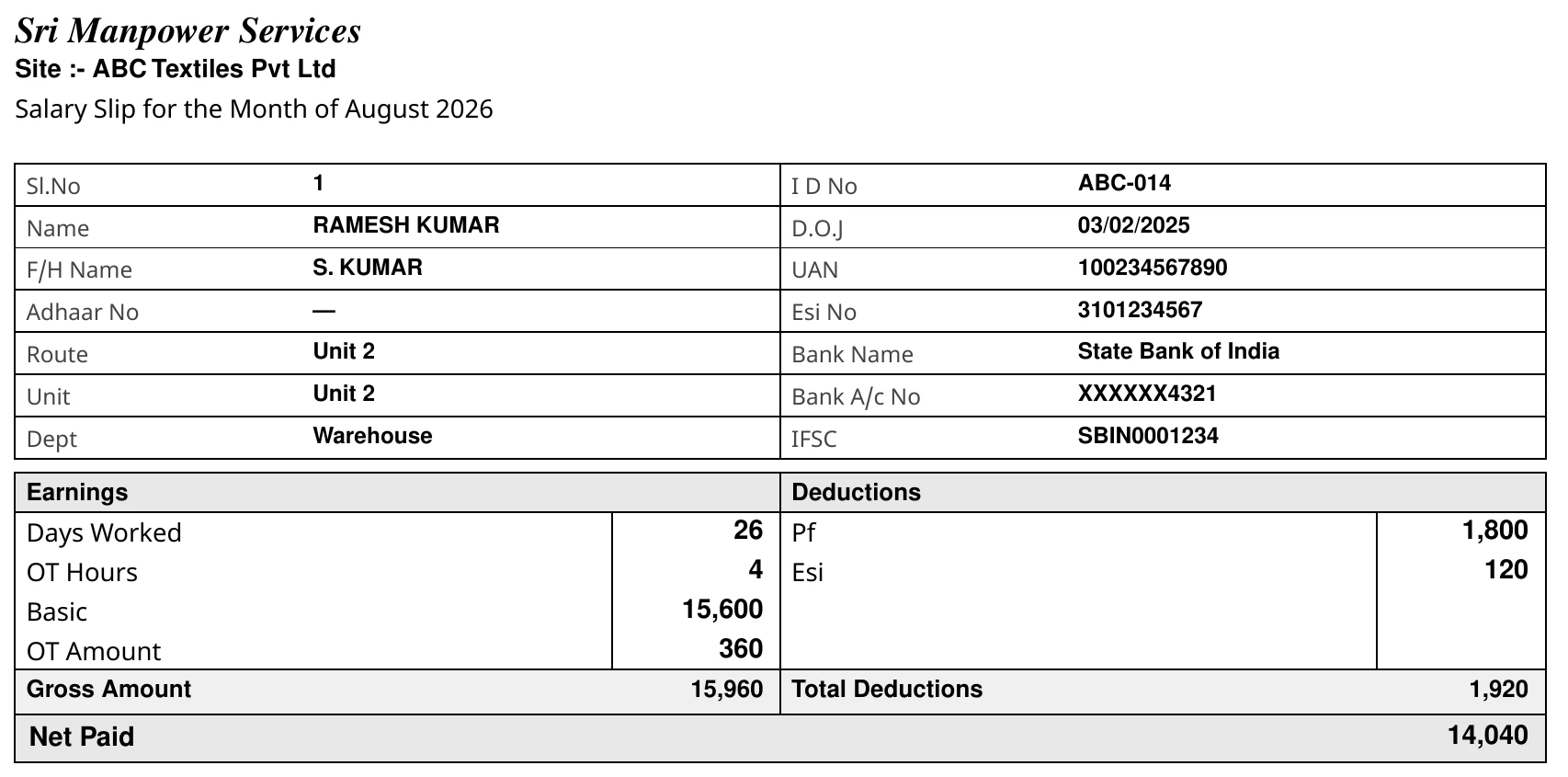
Per day ₹600OT doublePF on full wage
- Pay 26 days × ₹60015,600
- OT 4 hrs × ₹150 double600
- Gross16,200
- PF 12% of ₹15,600−1,872
- ESI 0.75%−122
Take home₹0
Put in the days once. Get everything you and your clients need every month — in minutes.
Want to see it first?
Day rate, monthly or fixed salary · OT rules · PF & ESI rules · allowances · cuts · advance · bonus · rounding — set once per client, used every month.
What you put in
ContractPay
What comes out
From attendance to your client's bill. You do only 2 steps. ContractPay does the rest.
Step 1
Upload the client's attendance Excel, or type the days. This is the only typing you do.
| Worker | Days | OT hrs |
|---|---|---|
| Ramesh K | 26 | 4 |
| Lakshmi D | 24 | 0 |
| Muthu V | 23 | 3 |
Step 2
Every client's own rules are used — day rate, OT, PF, ESI, advance. No maths for you.
Step 3
The software checks for mistakes first and tells you in plain words. You just press Approve.
Step 4
The bank file and every payslip are made in one tap. Upload the file to your bank — salary is paid.
Step 5
Government files are ready before the 15th, and your client's bill is ready the same day. No penalty. Paid on time.
Your work: 2 stepsTime: ≈ 20 minutes per clientMistakes reaching workers: 0
Every client has its own rules. Normal payroll software can't do this — ContractPay does it for every worker, every client, every month.
No second Excel. The month's wages become the client's bill in one tap — so nothing is missed and the client cannot argue.
As a contractor you must pay PF and ESI to the government and keep registers. Here is one month with ContractPay.
Upload each client's Excel or type the days. The software checks for gaps.
✓ Salary worked out. Payslips and bank file ready.
12% from the worker plus your employer share (EPF, EPS, admin, EDLI) for every worker with a UAN.
✓ ECR text file made. Upload, pay, done.
0.75% from the worker plus 3.25% from you, for workers under the ESI wage limit.
✓ ESI file made with the limit applied.
Client bill, salary statement, Form XXVII register, bio-data for inspections.
✓ All from the same month. Nothing typed twice.
| What | Worker pays | You pay | Due | ContractPay gives |
|---|---|---|---|---|
| PF (EPFO) | 12% | 12% + admin 0.5% + EDLI 0.5% | 15th of next month | ECR text file for the portal + Excel to check |
| ESI (ESIC) | 0.75% | 3.25% | 15th of next month | ESI file with the wage limit applied |
| Form XXVII register | — | — | Keep ready | Printed per site from the month's salary |
| Payslips | — | — | Every month | PDF for all workers, English or Tamil |
Rates shown are today's standard PF and ESI rules. You can set different rates for a client if needed.
When these are always on time, the client trusts you — and pays your bill on time.
More workers, lower price. No setup fee. No yearly lock-in.
Price is for live workers in the month. GST extra. Start with 30 days free, pay only if you continue.
Send us your Excel. We set up your first client company and its workers. Free.
15 minutes on the phone. We show your own client's salary inside the software.
Try it with real work. If you don't like it, just stop. Nothing to pay.
Start free trial →For manpower companies, security and housekeeping agencies.
Yes. Use it free for 30 days. No card needed.
Yes. Add each client company once, with its own rates, PF and ESI rules. Run salary, files and the bill for each one from one login.
Yes. It works out PF and ESI for every worker and makes the PF ECR file and the ESI file.
No. Simple words on every screen. Sample workers are already inside so you can try it right away.
₹40 per worker per month for small companies, going down to ₹24 per worker for 1,000+ workers. No setup fee.
Yes. It opens on any phone or computer, nothing to install. Screens are in English and Tamil.
30 days free. No card needed.
Want to see it first?